Does Del Taco take Apple Pay? The answer depends on how you place your order.
The Del Taco app does not currently support Apple Pay as a checkout option. However, some individual Del Taco restaurants may accept Apple Pay in-store or at the drive-thru when their payment terminals support contactless transactions.
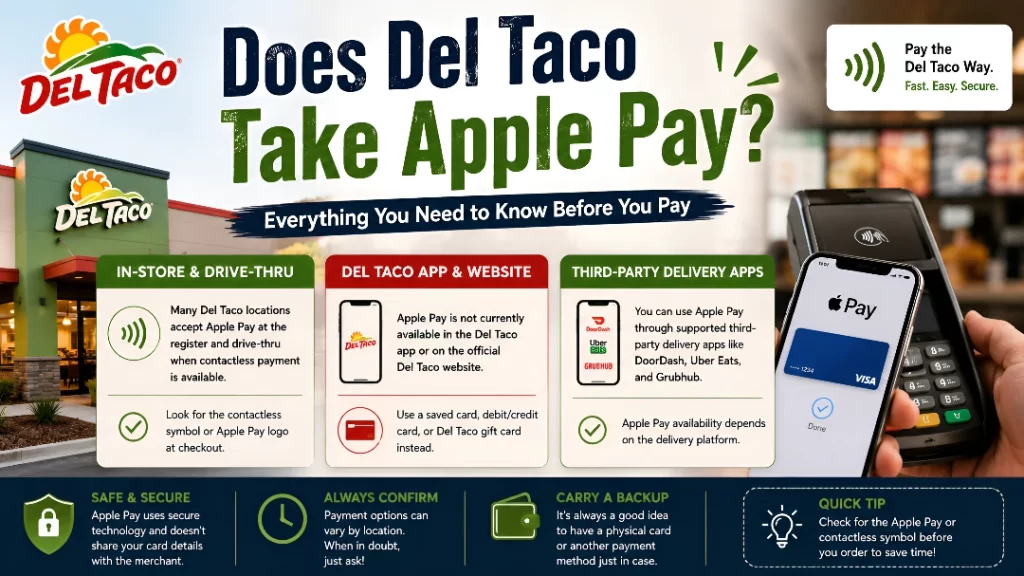
Because payment equipment can vary between company-operated and franchised restaurants, Apple Pay acceptance is not guaranteed at every location. The safest approach is to look for the Apple Pay or contactless-payment symbol, ask the cashier, and carry a backup card.
Third-party delivery apps may also accept Apple Pay even though the official Del Taco app does not.
Does the Del Taco App Take Apple Pay?
No. The Del Taco app does not currently accept Apple Pay for mobile-order checkout.
When placing an order through the app, customers must use one of the payment methods displayed during checkout. Depending on the account and ordering system, these may include:
- Credit card
- Debit card
- Stored payment card
- Del Taco gift card
- Another supported payment method
You should not expect to see an Apple Pay button or an option to authorize the purchase directly through Apple Wallet.
A credit or debit card stored in the Del Taco app is not the same as Apple Pay. Although both methods can use the same underlying card, they process the payment differently.
Apple Pay vs. a Stored Card
| Apple Pay | Stored card in the Del Taco app |
|---|---|
| Managed through Apple Wallet | Managed through the Del Taco account |
| Uses Face ID, Touch ID or passcode | Uses the app’s normal checkout process |
| Requires Apple Pay support | Requires standard card acceptance |
| Uses tokenized card information | Processed as a regular card payment |
| Not currently available in the app | May be available at checkout |
Manually entering the number from an Apple Card or another card stored in Wallet creates a regular card transaction. It does not turn the payment into Apple Pay.
Does Del Taco Take Apple Pay In Store?
Some Del Taco restaurants may accept Apple Pay at the counter, but acceptance is not guaranteed at every location.
Apple Pay requires a payment terminal with enabled NFC contactless technology. A restaurant may accept inserted or swiped cards while still lacking mobile-wallet support.
Before relying on Apple Pay, check for:
- Apple Pay logo
- Contactless-payment symbol
- Tap-to-pay message
- NFC-enabled card reader
- Confirmation from the cashier
Payment equipment can vary by restaurant. A Del Taco that accepts Apple Pay in one city does not prove that another location accepts it.
How to Check Whether a Del Taco Accepts Apple Pay
Use the following steps before visiting:
- Find the exact restaurant you plan to use.
- Call and ask whether it accepts Apple Pay.
- Confirm whether it works at both the counter and drive-thru.
- Look for the contactless-payment symbol at the register.
- Carry a physical credit or debit card as backup.
A clear question is:
“Does this location currently accept Apple Pay or contactless mobile payments?”
This avoids confusion between Apple Pay, tap-enabled credit cards and online payments.
How to Pay With Apple Pay at Del Taco
When the restaurant confirms Apple Pay acceptance, the payment process should work like any other contactless transaction.
Paying With an iPhone
- Tell the cashier you are paying with Apple Pay.
- Double-click the iPhone’s side button.
- Authenticate using Face ID or your passcode.
- Select another Wallet card when necessary.
- Hold the top of the iPhone near the payment reader.
- Wait for the confirmation checkmark.
Paying With an Apple Watch
- Double-click the side button.
- Select the desired payment card.
- Hold the watch near the contactless reader.
- Wait for the vibration or payment confirmation.
Do not move the device away too quickly. Keep it close to the reader until the transaction completes.
Does Del Taco Take Apple Pay at the Drive-Thru?
Del Taco drive-thru Apple Pay acceptance varies by restaurant.
The location must have a contactless payment terminal that employees can access from the drive-thru window. The employee may:
- Extend the card reader toward your vehicle
- Use a portable contactless terminal
- Ask you to hold the phone near a fixed reader
- Tell you that Apple Pay is unavailable
Ask about Apple Pay when placing your order at the speaker rather than waiting until you reach the payment window.
Say:
“Can I pay with Apple Pay at the drive-thru?”
This gives you time to prepare another payment method when necessary.
For privacy and security, avoid handing over an unlocked phone. Ask whether the reader can be brought close enough for you to complete the payment yourself.
Does Del Taco Take Apple Pay for Online Orders?
The official Del Taco app does not currently support Apple Pay. Browser-based checkout may also vary.
Apple Pay can be used on a website only when the checkout displays:
- Apple Pay button
- Apple Pay logo
- “Pay with Apple Pay”
- Wallet payment option
When Apple Pay is not displayed, choose another supported payment method.
Do not assume a website accepts Apple Pay simply because you are using Safari or an iPhone.
Does Del Taco Delivery Accept Apple Pay?
It depends on the ordering platform.
Delivery Through the Del Taco App
Apple Pay is not currently supported through official app checkout.
Customers must use the payment options displayed during the order.
Delivery Through a Third-Party App
A delivery platform may independently support:
- Apple Pay
- Google Pay
- PayPal
- Credit card
- Debit card
- Platform gift card
- Stored account balance
In this situation, the delivery company—not Del Taco—controls the payment system.
Look for Apple Pay during checkout. Availability may depend on your device, card, account and delivery platform.
Can You Use Apple Pay for Del Taco Pickup?
Apple Pay is not currently available for pickup orders placed through the official Del Taco app.
However, there are two possible alternatives:
- Order at the restaurant and use Apple Pay at a participating counter or drive-thru.
- Use an outside ordering platform that displays Apple Pay during checkout.
Remember that Del Taco rewards and app-exclusive offers may not work through an outside platform.
Can You Buy a Del Taco Gift Card With Apple Pay?
Apple Pay may not be available through the official online gift-card checkout.
Online gift-card purchases generally use the payment methods displayed by the gift-card store, such as:
- Visa
- Mastercard
- Discover
- Other listed card options
A participating physical restaurant may accept Apple Pay when purchasing a gift card at the counter, but that depends on the restaurant’s payment terminal.
Ask before requesting the gift card.
Can You Use a Del Taco Gift Card in the App?
An eligible Del Taco gift card may be used through supported app checkout.
This can be a useful alternative when Apple Pay is unavailable.
How to Use a Gift Card
- Open the Del Taco app.
- Sign in to your account.
- Select the correct restaurant.
- Add your food and drinks.
- Continue to checkout.
- Select the gift-card option.
- Enter the requested card information.
- Review the available balance.
- Complete the order.
Check whether the card covers the full total, including applicable taxes and fees.
Split-payment availability can vary.
“Sign in With Apple” Does Not Mean Apple Pay
Some customers see a Sign in with Apple option and assume Apple Pay is accepted. These are separate services.
| Apple service | Purpose |
|---|---|
| Sign in with Apple | Creates or accesses an account |
| Apple Pay | Pays using cards stored in Apple Wallet |
| Apple Wallet | Stores cards, passes and tickets |
| Apple Cash | Digital payment balance and card |
| Apple Card | Credit card issued through Apple |
An Apple login button confirms only that you can use an Apple account to sign in. It does not prove that Apple Pay will appear at checkout.
Can You Earn Del Yeah! Rewards While Using Apple Pay?
When a physical Del Taco accepts Apple Pay, you may still earn Del Yeah! Rewards on an eligible purchase.
Rewards and payment methods are separate parts of the transaction.
To earn points:
- Open the Del Taco app.
- Display your rewards code.
- Ask the cashier to scan it before payment.
- Apply an eligible reward when desired.
- Pay with Apple Pay when accepted.
- Keep the receipt until the points appear.
When the rewards code is not scanned, an eligible receipt-submission option may be available.
Purchases and charges that may not earn standard points can include:
- Gift-card purchases
- Taxes
- Tips
- Delivery fees
- Certain group orders
- Other excluded charges
Can You Redeem Rewards and Pay With Apple Pay?
Potentially, at a physical restaurant that accepts both Del Yeah! Rewards and Apple Pay.
The usual process is:
- Choose the reward in your account.
- Present or scan the reward before payment.
- Allow the cashier to apply it.
- Pay the remaining amount with Apple Pay.
Only one reward, coupon or offer may generally be allowed per transaction. Confirm the final discount before completing payment.
What Payment Methods Does Del Taco Accept?
Payment methods can vary by restaurant and ordering channel.
Possible options include:
- Cash
- Credit card
- Debit card
- Contactless card
- Apple Pay at participating restaurants
- Stored payment card in the Del Taco app
- Del Taco gift card
- Payment methods offered by third-party delivery apps
The options shown by the restaurant or checkout screen should be treated as final.
Apple Pay vs. Del Taco Gift Card
| Feature | Apple Pay | Del Taco gift card |
|---|---|---|
| Works in official Del Taco app | No | May be supported |
| Works at every restaurant | Not guaranteed | Participating restaurants |
| Stored in Apple Wallet | Yes | Depends on card type |
| Holds prepaid Del Taco funds | No | Yes |
| Requires an Apple device | Yes | No for physical cards |
| Can be used as a gift | Not directly | Yes |
| Balance must be checked | Card account controls funds | Yes |
A Del Taco gift card may be more practical for app orders, while Apple Pay may be faster at participating physical restaurants.
Can You Use Apple Card at Del Taco?
A physical Apple Card operates on the Mastercard network and may work anywhere the restaurant accepts Mastercard.
Using the physical Apple Card is not the same as using Apple Pay.
To pay through Apple Wallet, the Del Taco payment terminal must support Apple Pay. When it does not, you may still use the physical card or manually enter eligible card details during supported online checkout.
Does Del Taco Accept Apple Cash?
Apple Cash is generally used through Apple Pay. Therefore, it may work only at a physical Del Taco location that accepts Apple Pay.
The Apple Cash virtual card may also function where its associated card network is accepted, depending on the checkout.
Availability should be confirmed before ordering.
Does Del Taco Accept Tap-to-Pay Cards?
A location with a contactless terminal may accept tap-enabled debit and credit cards.
Contactless cards and Apple Pay use similar terminal technology, but acceptance is not always identical.
A restaurant might accept:
- Contactless Visa
- Contactless Mastercard
- Contactless debit card
- Apple Pay
- Google Pay
- Other mobile wallets
Ask the restaurant when the reader does not clearly display supported payment types.
Why Apple Pay Might Not Work at Del Taco
Several issues can cause an Apple Pay payment to fail.
The Del Taco App Does Not Support It
Apple Pay is not currently available through official app checkout.
The Restaurant Does Not Accept Contactless Payments
The terminal may accept inserted or swiped cards only.
Contactless Payments Are Disabled
A reader can display a contactless symbol while the feature is temporarily disabled.
The Terminal Is Offline
Equipment or network problems may block mobile payments.
Your Wallet Card Was Declined
Possible reasons include:
- Insufficient funds
- Credit limit reached
- Expired card
- Fraud-prevention block
- Card temporarily locked
- Unsupported card network
Authentication Failed
Face ID, Touch ID or the passcode must authorize the payment.
The Phone Was Positioned Incorrectly
Hold the top of the iPhone close to the contactless reader.
The Wrong Card Was Selected
Your default card may be expired or unavailable.
Apple Pay Is Not Fully Set Up
The card may still require bank verification.
How to Fix Apple Pay Problems
Try these steps:
- Confirm the restaurant accepts Apple Pay.
- Ask the cashier to select contactless payment.
- Hold the device closer to the reader.
- Keep it in position until confirmation appears.
- Select another Wallet card.
- Check whether the card is locked or expired.
- Confirm that Face ID or Touch ID works.
- Restart the Wallet app when necessary.
- Try an Apple Watch.
- Use a physical card or another backup method.
Avoid repeating a failed payment many times. Multiple attempts can create temporary pending authorizations.
Is Apple Pay Safe to Use at Del Taco?
Apple Pay is designed to reduce the need to share your actual card number with the merchant.
Potential security benefits include:
- Face ID, Touch ID or passcode authentication
- Tokenized payment information
- No need to hand over a physical card
- Contactless checkout
- Lost-device management
- Reduced exposure of card details
Customers should still protect:
- Device passcode
- Apple account
- Wallet cards
- Banking credentials
- Verification messages
Never provide an Apple verification code to a cashier, delivery driver or unknown caller.
Is Apple Pay Faster at the Drive-Thru?
Apple Pay can be fast when the drive-thru has an accessible contactless reader.
It may still take longer when:
- The terminal is inside the restaurant
- The employee cannot move the reader
- Contactless payment is disabled
- The selected Wallet card is declined
- The restaurant does not accept Apple Pay
Open Apple Wallet before reaching the window, but wait until the cashier is ready before authenticating the payment.
Tips for Paying at Del Taco
Ask Before Ordering
Confirm Apple Pay acceptance before placing a large drive-thru order.
Scan Rewards First
The rewards account should normally be scanned before payment.
Check the Reader
Look for a contactless symbol.
Bring a Backup
Carry a physical debit or credit card.
Review the Checkout Screen
For app and online orders, use only the payment methods shown.
Keep the Receipt
A receipt can help with missing points, duplicate charges or payment disputes.
Check Pending Transactions
A failed contactless attempt may temporarily appear as pending. Confirm whether it posts or disappears before disputing it.
FAQs About Del Taco and Apple Pay
1. Does Del Taco take Apple Pay?
Some physical locations may accept it, but acceptance is not guaranteed nationwide.
2. Does the Del Taco app accept Apple Pay?
No. Apple Pay is not currently supported in the official app.
3. Can I use Apple Pay inside Del Taco?
Yes, when the restaurant has an enabled contactless terminal.
4. Does the Del Taco drive-thru take Apple Pay?
It depends on the location and its payment equipment.
5. Can I pay for Del Taco pickup with Apple Pay?
Not through the official Del Taco app.
6. Does Del Taco delivery accept Apple Pay?
Third-party delivery apps may accept it, but the official app does not.
7. Can I use Apple Pay on Del Taco’s website?
Only when Apple Pay appears as a checkout option.
8. Can I buy a Del Taco gift card with Apple Pay?
Possibly in-store at a participating location, but online support is not guaranteed.
9. Can I use a Del Taco gift card in the app?
Yes, through supported app checkout.
10. Is Sign in with Apple the same as Apple Pay?
No. One is for account access and the other is for payment.
11. Can I earn rewards while paying with Apple Pay?
Yes, when the location accepts Apple Pay and your rewards account is scanned.
12. Can I use Apple Watch at Del Taco?
Yes, at locations with compatible contactless terminals.
13. Why did Apple Pay fail?
The terminal may not support it, or your Wallet card may have been declined.
14. Does Del Taco accept Apple Card?
The physical Apple Card may work wherever Mastercard is accepted.
15. What should I use when Apple Pay is unavailable?
Use an accepted physical card, cash or Del Taco gift card.
Final Thoughts
So, does Del Taco take Apple Pay?
The answer depends on the ordering method:
- The Del Taco app does not currently support Apple Pay.
- Some physical restaurants may accept Apple Pay at the counter.
- Drive-thru acceptance depends on the location and terminal.
- Third-party delivery apps may support Apple Pay independently.
- Online checkout works only when Apple Pay appears as an option.
- Del Taco gift cards may be used through supported app checkout.